
How tradespeople can turn completed jobs into website content
By Gael Parent
Start with one finished job. Record what changed, what you installed and one important decision. Add photographs that explain the work, publish a project summary or case study, and link it to the relevant service and enquiry page.
You finish a job, take a few photographs and move on to the next customer. A short explanation of the work can make those images useful to someone planning a similar project.
This guide covers that process. For help deciding which services and locations to prioritise, start with our guide to SEO for trades in Ireland. The examples here come from Patio Paving Dublin, a business Webiwant works with.
- 01Record the factsWhat changed, what you did and why.
- 02Choose the photosShow the starting point, work and finish.
- 03Write the projectExplain one job in clear, specific terms.
- 04Publish and linkPlace it where customers need the evidence.
Choose a job that answers a customer’s question
Pick a recently completed job that represents work you would like more of. It can be a modest installation if the starting point, work and finish are easy to explain.
Think about what a prospective customer needs to know:
- Have you worked on a property or outdoor space like mine?
- What does this material look like once installed?
- What is included beyond the visible finish?
- Have you completed similar work nearby?
Choose one main question for the project to answer. That gives you a reason to select particular photographs and explain particular decisions.
Capture the details while the job is fresh
The person updating the website may not have been on site. Send a short voice note or complete a job record before the details disappear into next week’s schedule.
| Record | What to include |
|---|---|
| Location and date | Town or neighbourhood, county where helpful, and completion month and year. |
| Starting point and brief | What was there before and what the customer asked to change. |
| Work and materials | Main tasks, associated work, material, finish and product name if known. |
| Constraint and decision | One factor that affected the job and the installer’s explanation of the choice made. |
| Photographs | Original before, progress, finished and detail images, labelled by stage. |
| Publication agreement | Which images, details and customer feedback can be shown publicly. |
Download the blank job-record template and keep one copy with each project’s photographs.
Select photographs that explain the work
A small set of purposeful images is enough to tell a clear story:
- Before: show the original condition or layout.
- During: show a stage that explains what the job involved.
- After: show the completed work, ideally from the same viewpoint as the before image.
- Detail: show a feature worth examining, such as an edge, step, junction or finish.
A caption should tell the reader what to notice. Image descriptions should describe the visible content clearly. Keep original files in the job folder and prepare appropriately sized versions for the website.
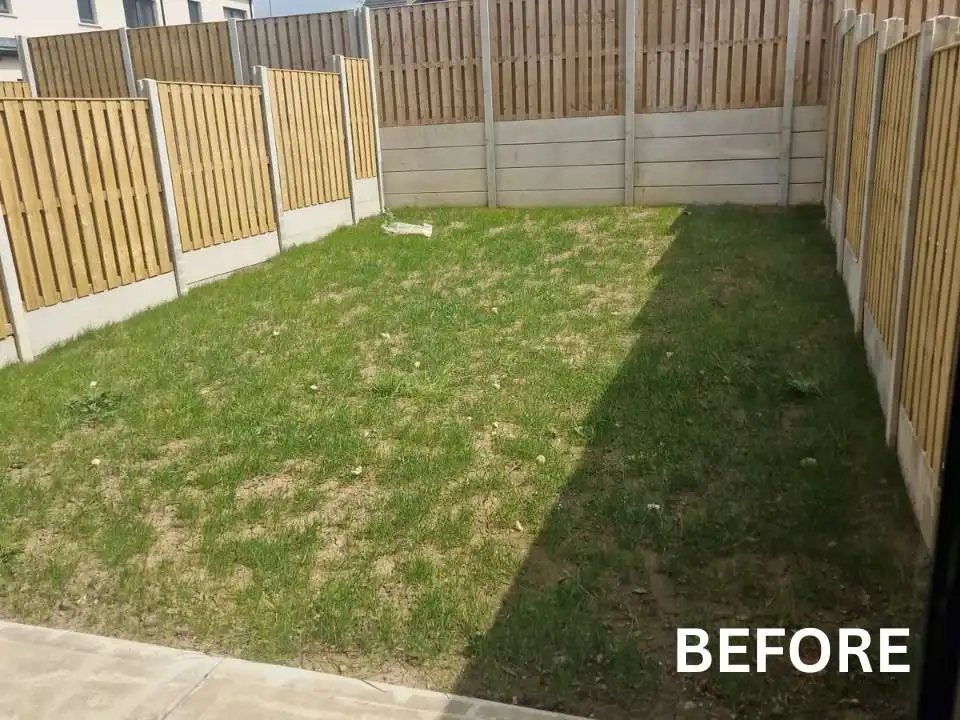
The starting point
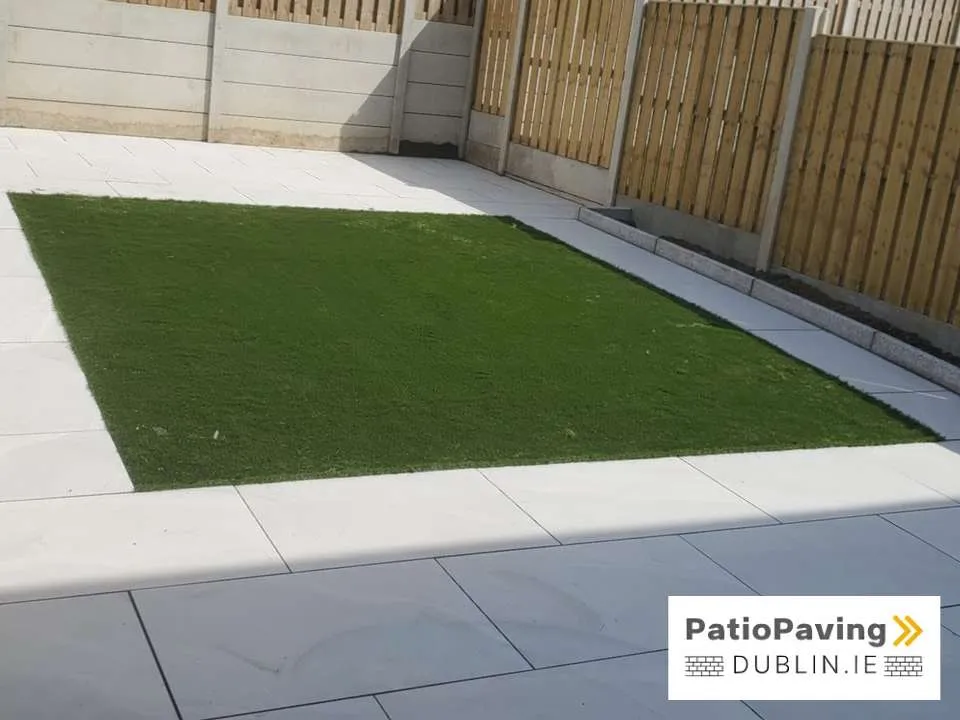
The finished layout
Worked example: turn the job record into project copy
Here is how the process works for the April 2026 Blanchardstown project. This example record is reconstructed from the published account. It shows how a writer can organise the available facts.
A filled job record
| Place and date | Blanchardstown, Dublin 15; April 2026. |
|---|---|
| Starting point | A basic lawn. |
| Work | Large-format porcelain paving, artificial grass and boundary flowerbeds. |
| Layout | Paving around a central grass area. |
| Further information to collect | The customer’s brief and the reason for the layout. |
Those facts support a short project block. A longer case study would need more detail about the brief, decisions and work involved.
A short version for the website
Example project block
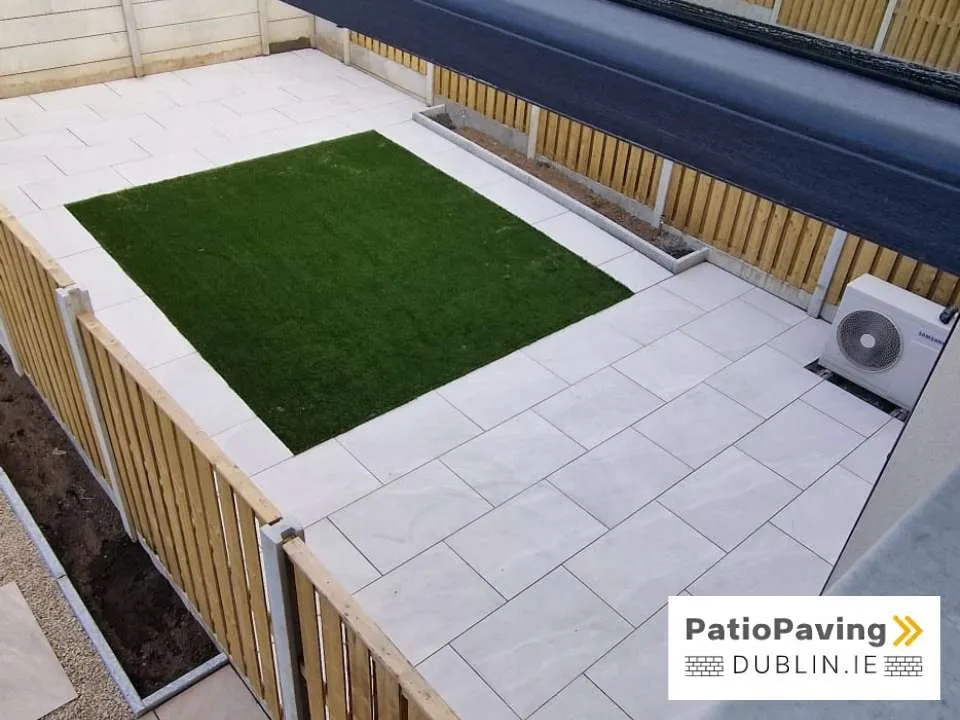
Porcelain patio and artificial grass in Blanchardstown
This April 2026 project replaced a basic lawn with porcelain paving around a central artificial grass area. Flowerbeds were added along the boundaries.
Planning similar work? Explore our porcelain patio installation service or tell us about your garden.
The copy names the job and describes the change. Its links let the reader explore the service or enquire. The wording can be expanded when the installer supplies more detail.
On the published area page
Sandyford: explain work beneath the finish
The Sandyford project account lists groundwork, a raised porcelain patio, steps, a perimeter path, new lawn, channel drains and recessed access covers. These details provide material for a fuller explanation.
Ask the installer which preparation mattered most, how the different levels connected and why access covers needed to remain reachable. One clear explanation can tell a customer more than a long list of technical features.
Choose where the project belongs
The amount of information you have should guide the format. A few strong photographs and a short explanation may be enough for an existing page.
| Destination | Use it when… | Include |
|---|---|---|
| Service page | The job illustrates a service or material. | A short example, relevant images and a route to enquire. |
| Recent projects page | Visitors need to browse your work. | Consistent summaries with dates, areas and relevant links. |
| Existing area page | The job demonstrates work in that location. | Local context and enough detail to understand the job. |
| Dedicated project page | You can explain the brief, decisions, work and outcome. | A fuller account with supporting images and a next step. |
| Gallery | Visitors mainly want to compare appearances. | Selected images, captions and links to explanations. |
A new location page needs its own justification. One completed job can strengthen an existing area page without requiring another page targeting the same town.
For the wider relationship between service pages, location pages and customer evidence, see our local SEO approach.
Connect the project to a useful next step
Use a descriptive link to the relevant service, such as “porcelain patio installation”. A visitor who likes the result may still need to understand what the service includes before making contact.
If the project has its own page, link to that fuller account from shorter summaries elsewhere. Tailor each introduction to its page and keep the material, date, location and scope consistent.
End with an enquiry prompt that suits your process. Ask where the property is, what the customer wants to change and any information you can use to assess the next step. Make clear when a site visit is needed to prepare a quote.
Check the facts, images and page before publishing
- Facts: have the installer check materials, scope, dates and reasons. Leave gaps unfilled until you have an answer.
- Claims: describe what the evidence demonstrates. A completion photograph cannot establish long-term performance.
- Permission and privacy: check the agreed photographs and feedback. Avoid exposing residential addresses, faces, vehicle registrations or private belongings unnecessarily.
- Images and mobile display: check useful captions, accurate image descriptions, readable text and comfortable loading on a phone.
- Links and enquiry route: open every link and check that the contact option is easy to find and works.
If you use AI to organise the notes, ask it to flag missing details and have the installer review the draft against the job record.
Make it repeatable and review what happens next
Keep one folder per job, named with the service, area and completion date. Give one person responsibility for collecting the information and another, where needed, for preparing the page.
When reviewing the content, check whether prospective customers mention it, whether it answers questions during sales conversations, and whether visitors continue to service pages or enquiry forms. Where tracking is available, distinguish a click towards a form from a successful submission. Enquiry records help confirm what was actually received.
These observations can guide your next project write-up. Publishing a project alone does not establish that it caused a ranking change or a new enquiry.
The aim is to give customers specific evidence they can understand. Google’s guidance on helpful content also asks creators to consider original information, clear sourcing and experience with the subject.